 LaCleo
The short answer
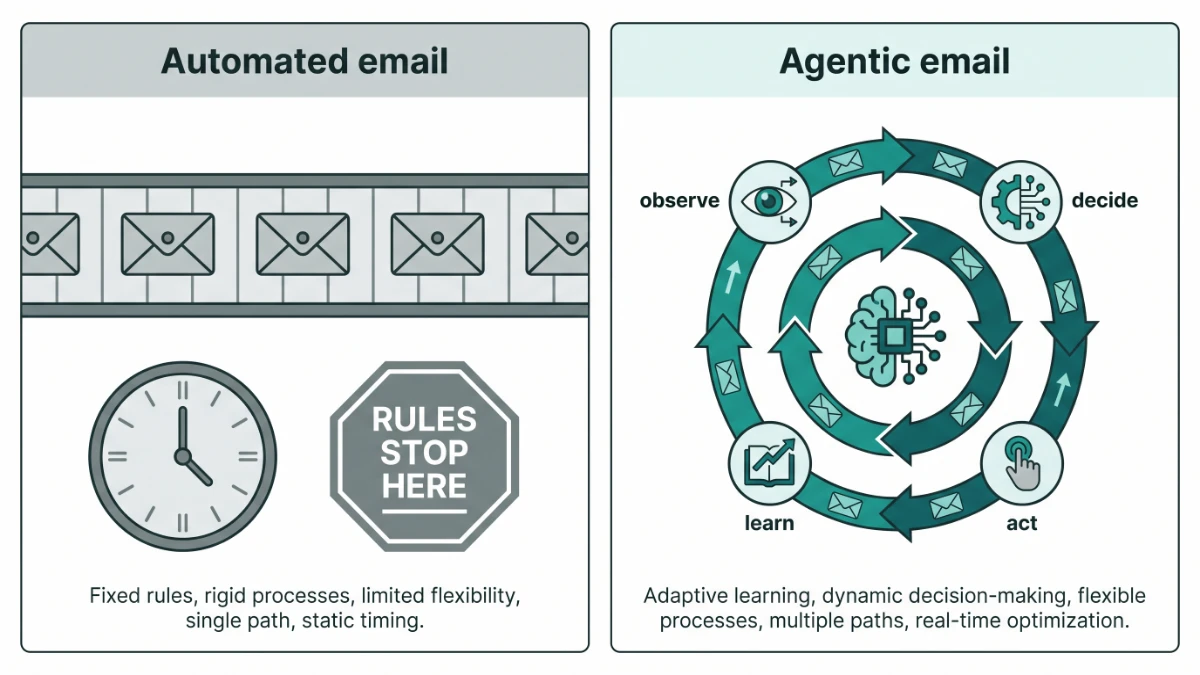
Agentic email marketing is outbound email run by an AI agent that observes results, decides what to change and acts on it within limits a person has set. It differs from automated email marketing, which executes a fixed sequence and only changes when someone edits it.
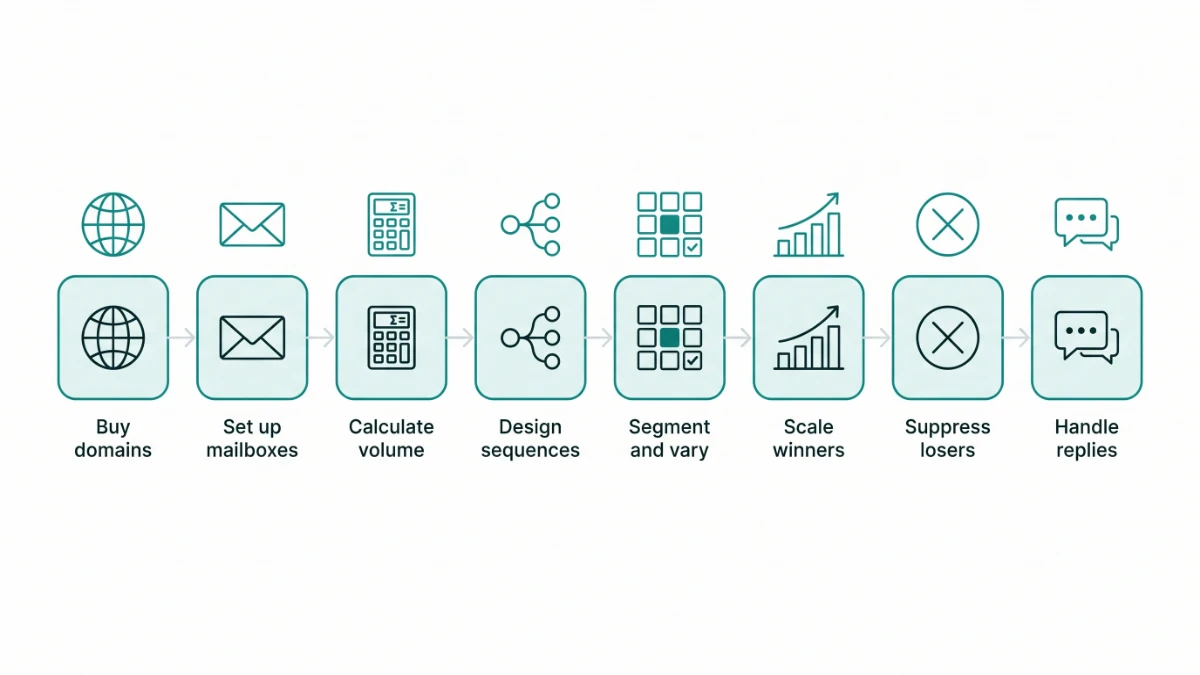
The process has eight steps: buy secondary sending domains, buy and warm mailboxes, calculate volume and spread it across weeks, let the agent design the communications, segment the list and run variations, scale the variants that earn positive replies, suppress the variants, mailboxes and contacts that hurt results, and hand reply handling to the agent. Done properly, it replaces most of the manual work of an outbound team, holds bounce rates under 1% and keeps improving with every send.
Most outbound programs fail in the same two places, and the 2026 benchmark data shows how wide the gap between average and top-quartile has become. The first is infrastructure: a team sends cold volume from the company's main domain, skips warmup, and finds out three weeks later that half their mail is landing in spam. The second is attention: the sequence that was written in January is still running in June, nobody has looked at which variant actually earns replies, and the inbox where replies arrive is checked when someone remembers to.
An agent solves the second problem directly and, if you build the process around it, the first one too. This guide walks through the full process we run, in the order we run it, with the numbers at each stage. It ends with what a software testing vendor saw across twelve weeks and a plain account of how we do it.
Key takeaways
- Automation follows rules; an agent makes decisions. The observable difference is that an automated campaign performs the same in week eight as in week one, and an agentic campaign does not.
- Infrastructure is not optional. Senders passing 5,000 messages a day to consumer inboxes at Gmail, Yahoo or Microsoft must pass SPF, DKIM and DMARC, support one-click unsubscribe and keep complaints under 0.3%. Non-compliant mail is now rejected outright, not just filtered.
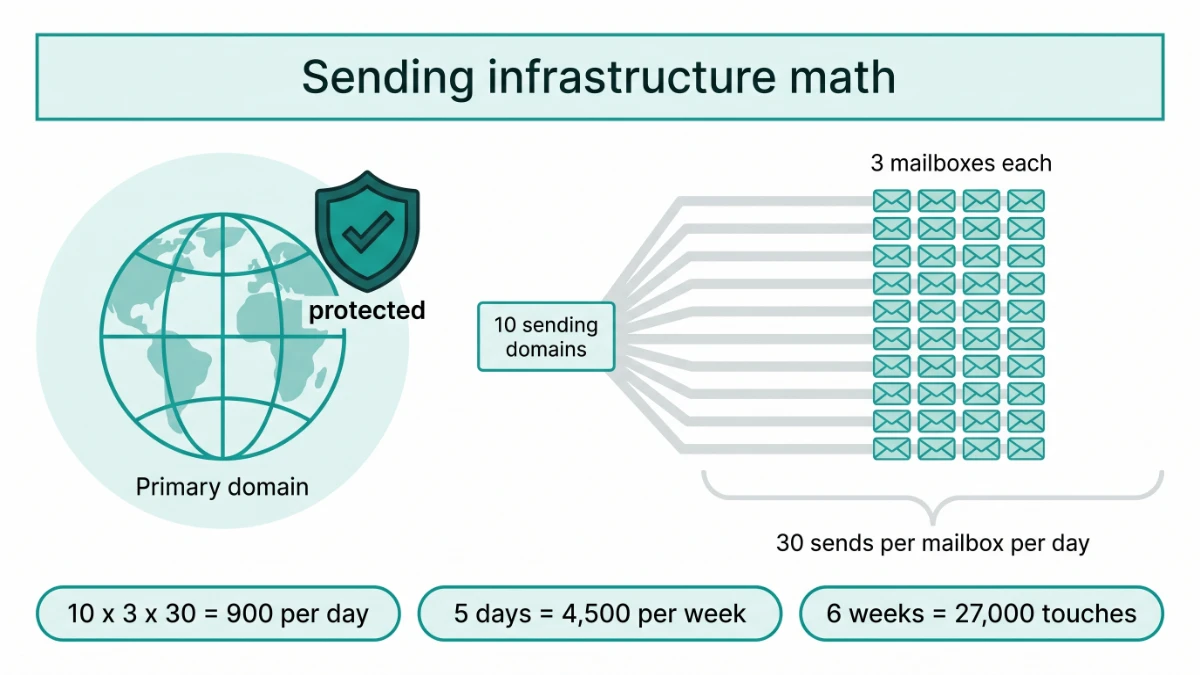
- The math is simple and most teams skip it. Around 30 sends per mailbox per day, three mailboxes per domain, two to four weeks of warmup before a mailbox carries campaign volume.
- Reply rate is the only performance metric worth optimizing. The 2026 average is 3.4%; the top quartile reaches 5.5%; the best exceed 10%. Open rates are inflated by Apple Mail and bounce rate is a health measure, not a performance one.
- Follow-ups are not optional either. Roughly 42% of replies arrive after the first email. A four to seven touch sequence is the working range.
- Reply handling is where the pipeline leaks. Top teams answer positive replies within an hour. An agent answers within minutes, classifies every reply, and only escalates what it cannot resolve.
Sources: Instantly 2026 Cold Email Benchmark Report; Google, Yahoo and Microsoft bulk sender requirements; Cleverly cold email statistics, April 2026. Full table in the statistics section.
What is agentic email marketing?
Agentic email marketing is outbound email where an AI agent, rather than a person or a rule set, decides what to send, to whom, when, and what to do with the result. The agent is given a goal, an offer, a list, a set of constraints and a budget of sends. It then drafts the communications, allocates them across segments, watches bounce, complaint, placement and reply data, shifts volume towards what works, cuts what does not, and handles the replies. A person sets the limits and reviews the decisions. The agent does the work.
The word agentic matters because it names the thing that changed. AI has been used in email for years to write subject lines and predict send times. That is AI as a feature inside an automated system. An agentic system inverts the relationship: the model runs the loop, and the automation tooling becomes the hands it uses to send, pause and reply. It is the same shift described in how agentic AI is replacing entire marketing teams, applied to one channel.
Three properties make a system agentic rather than automated with an AI feature bolted on:
- It observes. The agent reads the campaign's own results, not just its own outputs. Bounce codes, complaint signals, placement tests, reply text and reply sentiment all come back into the loop.
- It decides. Given those observations, it chooses among actions: rewrite, reallocate, pause, escalate, suppress, book. Rules can express some of these choices, but rules cannot express the reasoning behind them or generalize to a situation the rule writer did not anticipate.
- It learns. The outcomes of its decisions become training signal. A model that has seen thousands of sequences and their replies does not start every campaign from zero, and the same model gets better with each campaign it runs.
What is the difference between agentic and automated email marketing?
Automated email marketing executes a sequence a human wrote in advance. Agentic email marketing decides what the sequence should be, and keeps deciding as results come in. The distinction sounds academic until you watch two campaigns run side by side for eight weeks.
An automated campaign on day one sends email one to everyone in the list. On day four it sends email two to everyone who has not replied. On day eight it sends email three. It does not know that the email two subject line is bouncing off one segment and landing with another, that one of the sending mailboxes has started going to spam, or that a third of the replies are out-of-office notices with a return date in them. It will run exactly the same way on week eight as it did on week one, and it will stop when a person stops it.
An agentic campaign on day one sends variant A to a third of segment one, variant B to a third, and variant C to the rest, and does the same across the other segments. By day five it has enough positive-reply data on two of the segments to shift new contacts towards the better variant and to generate a fourth variant that borrows the working element. It has paused one mailbox whose placement test failed. It has read the out-of-office replies and scheduled a re-touch for the return dates. It has answered four pricing questions from an approved knowledge base and booked two meetings. On week eight it is running a different sequence from the one it started with, and the reply rate is higher.
Agentic vs automated email marketing, feature by feature
| Dimension | Automated email marketing | Agentic email marketing |
|---|---|---|
| What drives the campaign | Rules a person wrote in advance | An agent reasoning over live results within set limits |
| Message creation | Fixed templates with merge fields | Drafted per segment from the offer and proof points, varied continuously |
| Sequence timing | Fixed delays between touches | Adjusted per segment and per contact, including re-touch after out-of-office dates |
| What it optimizes for | Nothing; it reports opens and clicks | Positive reply rate, with bounce and complaint rate as guardrails |
| Deliverability | Warmup tool runs in the background; a person checks placement occasionally | Placement tested continuously; mailboxes rotated, throttled or paused on signal |
| Reply handling | Replies land in a shared inbox for a person to triage | Every reply classified and answered or escalated within minutes |
| Improvement over time | Only when someone edits the sequence | Every send is a data point; the model improves across campaigns |
| Human role | Write, launch, monitor, triage, fix | Set limits, approve knowledge base, review escalations, take meetings |
One caveat that matters. An agentic system is only as good as the constraints it is given. If you are weighing this against running outbound yourself, the trade-offs are set out in LaCleo vs DIY outbound. Left without limits, an agent will optimize reply rate by sending more, which is exactly how domains get burned. The limits in the next three steps are what make the rest of the process safe.
Step 1: How do you buy domains for cold email?
Never send cold volume from the primary company domain. Buy secondary domains that resemble it, point them at the main site, authenticate each one, and treat them as consumable. This is the single decision that protects the company's transactional and customer email from anything the outbound program does.
The reasoning is simple. Sender reputation is tracked per domain. If a campaign trips a complaint threshold or a spam trap, the domain that sent it is penalized. If that domain is the one your invoices, password resets and customer support come from, the outbound program has just damaged the core business. A secondary domain absorbs that risk and can be rested or retired without consequence.
What to buy
- Close variants of the brand name. If the company is acme.com, buy acme-hq.com, tryacme.com, acmeteam.com, getacme.com and similar. Prospects should recognize the brand at a glance; a random string in the sender address reads as spam to both humans and filters.
- Mainstream top-level domains. .com first, then .co, .io, .net where the brand fits. Unusual TLDs carry worse baseline reputation.
- Enough of them. The number comes from the volume math in step three. For most B2B programs it is between five and fifteen domains at the start.
- Age is a bonus, not a requirement. A domain that has existed for a year with clean history warms faster. Freshly registered domains work fine with a proper warmup period.
What to configure on each domain
Since February 2024, Google and Yahoo have required bulk senders to authenticate, and Microsoft joined them in 2025. The three providers now enforce nearly the same rulebook: anyone sending more than 5,000 messages a day to their consumer addresses must pass SPF, DKIM and DMARC with an aligned From domain, support one-click unsubscribe and keep spam complaints under 0.3%. Enforcement has moved from spam-foldering to permanent rejection at the SMTP level. Each sending domain therefore needs:
- SPF listing every service that sends on the domain's behalf, under ten DNS lookups, ending in a soft or hard fail.
- DKIM with 2048-bit keys, enabled at both the mailbox provider and any sending platform.
- DMARC at a minimum of p=none with reporting, moving to quarantine once the reports are clean.
- A valid PTR record so reverse DNS resolves.
- A redirect from the secondary domain to the primary site, and a custom tracking domain if link tracking is used.
Most of this is a one-time setup per domain and takes under an hour; the technical deliverability guide walks through each record, and the free deliverability score will tell you whether an existing domain passes. The mistake teams make is not doing it, then discovering the failure in the bounce logs two weeks into the campaign.
Step 2: How do you buy and set up mailboxes?
Create two to three mailboxes per sending domain, spread across at least two mailbox providers, give each a real name and profile, and put every one of them into warmup before it sends a single campaign email. Mailboxes are the unit that actually carries volume, and their limits set the ceiling for the whole program.
Why two to three per domain
Each mailbox has a safe daily ceiling for cold sends, which we set at around 30 outbound campaign messages. Above that, provider heuristics begin to treat the account as a bulk sender rather than a person. Below three mailboxes per domain, the domain's total capacity is too low to be worth the DNS setup. Above three, the domain starts to look like a farm. Three is the working number.
Why two providers
Sending only from one provider means one policy change or one reputation event affects everything. Splitting across Google Workspace and Microsoft 365, or across a dedicated sending infrastructure provider and one of those, keeps the program resilient. It also matters for placement: mail sent from a Microsoft mailbox to a Microsoft recipient behaves differently from mail sent from Google to Microsoft, and an agent that can choose the sending mailbox per recipient provider gets a placement advantage.
Warmup: natural, not just automated
Warmup is the process of building sending history so that providers treat a new mailbox as legitimate. New domains need at least two to four weeks of gradual sending before they carry campaign volume, starting at five to ten emails a day and ramping over four to six weeks. Skipping it sends most mail directly to spam.
Warmup tools that exchange messages inside a network of other warming mailboxes are useful, but they are also detectable, and providers have grown better at discounting them. What an agentic system adds is natural warmup: during the ramp, the agent sends a small number of real, low-risk messages to real recipients, gets real replies, and mixes them with the tool-driven volume. Reputation built on real conversations is worth more than reputation built on synthetic ones, and it is the reason our inbox placement holds after warmup ends rather than dropping. The cold email setup guide has the day-by-day ramp schedule.
Where the manual process usually breaks
A person setting up thirty mailboxes by hand will make configuration mistakes on a few of them, and those mistakes only surface once volume starts. Part of the value of an agentic setup is that every mailbox is checked against the same authentication and placement test before it enters rotation, and re-checked on a schedule after.
Step 3: How do you calculate the numbers and spread communications across weeks?
Work backwards from the list size and the number of touches, cap each mailbox at roughly 30 sends a day, and spread the campaign so that daily volume is flat from the first week to the last. Spiky sending is the most common way a healthy setup gets flagged.
Here is the arithmetic for a typical mid-sized program:
Volume plan for a 10,000-contact list with four touches over six weeks
| Input | Value | Note |
|---|---|---|
| Contacts | 10,000 | Verified before load; anything unverified inflates bounces. See agentic prospecting for how lists are built |
| Touches per contact | 4 | Working range is 4 to 7; replies keep arriving through touch four |
| Total sends required | 40,000 | Before suppression removes replied and bounced contacts |
| Realistic sends after suppression | ~35,500 | Around 15% of contacts drop out of each later touch |
| Campaign length | 6 weeks, 30 sending days | Weekdays only; weekend sends underperform for B2B |
| Required daily volume | ~1,180 | 35,500 divided by 30 days |
| Sends per mailbox per day | 30 | Our cap for cold campaign mail per mailbox |
| Mailboxes needed | 40, rounded to 44 | Headroom for a mailbox to be paused without missing volume |
| Domains needed | 15 | At three mailboxes per domain |
Spreading it across weeks
The mistake is to load the whole first touch in week one. If touch one goes to all 10,000 contacts in week one, the mailboxes are idle by week four and the program has a volume spike in week one that looks nothing like a human sending pattern. Instead, the agent staggers first touches so that new contacts enter the sequence every day, follow-ups are spread across the same days, and each mailbox sends a stable mix of first touches and follow-ups from day one to day thirty.
The two weeks before that are warmup, so a six-week campaign is really an eight-week program: two weeks of ramp, six weeks of steady volume. Anything that shortens the ramp costs more in placement than it saves in calendar time.
Sending volume reference
Four touches over six weeks at a 30-per-mailbox daily cap, the configuration most programs start from. Find your list size, read across.
| Contacts | Sends after drop-off | Sends per day | Mailboxes | Domains |
|---|---|---|---|---|
| 2,500 | 8,875 | 296 | 11 | 4 |
| 5,000 | 17,750 | 592 | 22 | 8 |
| 10,000 | 35,500 | 1,183 | 44 | 15 |
| 25,000 | 88,750 | 2,958 | 107 | 36 |
| 50,000 | 177,500 | 5,917 | 214 | 72 |
To run your own numbers
Total sends = contacts × (1 + (touches − 1) × 0.85), allowing 15% drop-off per later touch. Divide by weeks × 5 sending days for the daily figure, divide that by your per-mailbox cap for mailboxes, add 8% headroom so a mailbox can be paused without missing volume, then divide by three for domains. Add two weeks of warmup before day one. Keep the cap at or under 40 a mailbox, and the campaign at three weeks or longer, or follow-ups stack onto the same days as first touches and daily sends spike.
Step 4: How does agentic communications design work?
The agent is not handed a template. It is handed the offer, the proof points, the tone rules, the things it must never claim, and the goal of each touch. It then drafts a sequence for each segment with a stated reason for every message. That reason is what a reviewer approves, and it is what the agent uses later to explain why a variant worked.
What the agent is given
- The offer, in one paragraph, including who it is for and what it replaces.
- Proof points that have been checked: named outcomes, numbers, certifications, customer categories. Nothing goes in the knowledge base that the client cannot substantiate, because the agent will use it.
- Tone rules: sentence length, formality, whether humor is allowed, words to avoid.
- Boundaries: no discounts offered, no comparisons naming competitors, no claims about results the client has not measured.
- The job of each touch. Touch one earns the right to a second email. Touch two adds a proof point. Touch three offers a different angle or a lighter ask. Touch four closes the loop.
What the agent produces
For each segment, a four to seven touch sequence in which each email is short, makes one point, and ends with one question. The model has been trained over thousands of outbound sequences and their reply data, so its first draft is not a first draft in the human sense: it already reflects the structures that earn replies in that industry and that role. What it does not know on day one is this client's list, and that is what the next four steps teach it.
Personalization is where the agent's advantage is clearest. Campaigns using advanced personalization have been measured at roughly twice the reply rate of generic templates, and the reason most teams do not personalize beyond the first name is that it takes a person several minutes per contact. An agent that has the contact's role, company, recent trigger and the segment's proof points writes a relevant opening line in seconds, for every contact, and it does not get tired at contact four hundred.
A rule we hold to
Every draft is reviewed by a person before the first send, and every new variant the agent generates later is logged with its rationale. The agent has authority to vary within the approved boundaries. It does not have authority to widen them.
Step 5: How do segmentation and multiple variations work?
Segment the list by role, industry, company size and trigger, then run at least three message variants per segment from the start, so that within a week there is real performance data to compare. Variation is not for its own sake. It is the only way the agent can learn which framing this list responds to.
Segmenting
The useful segments are the ones where the offer's value changes. A QA lead cares about coverage and release cadence. A VP of Engineering cares about defect escape rate and cost. A CTO cares about risk and headcount. Sending them the same email wastes three-quarters of the list. Typical dimensions:
- Role and seniority: practitioner, manager, executive.
- Industry or vertical: the proof points that land in fintech do not land in gaming.
- Company size: a 50-person startup and a 5,000-person enterprise have different buying processes and different objections.
- Trigger: a recent hire, a funding round, a job posting for the role the product replaces, a technology change on their site.
- Recipient mail provider: not a messaging segment, but a sending one; it decides which mailbox sends.
Varying
Within each segment the agent runs variants that differ on one meaningful axis at a time: the opening angle, the proof point led with, the length, the ask. It splits new contacts evenly across variants until each variant has enough sends to be judged. It judges on positive replies, not opens, because Apple Mail preloads tracking pixels and accounts for close to half of recorded opens, which makes open rate a directional signal at best.
The number of variants a human team can maintain is limited by the time it takes to write, load and track them; the reply handling step below is where that constraint bites hardest. The number an agent can maintain is limited by list size, because each variant needs enough sends to reach a decision. For a 10,000-contact list across five segments, three to four variants per segment is the practical starting point, and the agent generates more as segments prove out.
Step 6: How do you scale the best performing communications?
Once a variant has enough sends to be judged on positive reply rate, move a larger share of new contacts in that segment onto it, and let the agent generate adjacent variants that keep the working element and change one other thing. Scaling is reallocation, not just more sending.
The decision rule matters. A variant that has had 60 sends and two positive replies is not a winner; it is noise. We wait for a minimum send count per variant and compare on positive reply rate with a simple confidence check before shifting allocation. The agent applies the same rule on every segment every day, which is the part a human team cannot sustain: not the analysis, which is easy, but the daily discipline of doing it.
When a variant is scaled, the agent does two further things. It generates two or three neighbors of the winner, each changing one element, so that the next round has something to compare against. And it looks across segments: if a proof point is winning in one vertical, it tests that proof point in the adjacent vertical where it has not yet been tried. This cross-segment learning is where the compounding comes from. Week one variants are guesses. Week four variants are informed by three weeks of replies across the whole list.
Scaling never means raising the per-mailbox cap. If the winning variant deserves more volume than the current mailboxes can deliver, the answer is more mailboxes entering warmup, not more sends per mailbox.
Step 7: How do you suppress low performing mails?
Suppression runs on three levels: pause variants that trail on positive replies, pause mailboxes whose bounce or complaint rate rises, and permanently suppress contacts who have bounced, complained, replied negatively or asked to stop. Suppression is what keeps the infrastructure healthy while scaling pushes for results.
Variant suppression
A variant that has reached the minimum send count and trails the segment leader by a clear margin on positive reply rate is paused. It is not deleted; the agent keeps its data as a negative example. A variant that earns replies but a disproportionate share of negative ones is paused regardless of its total, because negative replies precede complaints.
Mailbox suppression
The thresholds here are external and non-negotiable. Bounce rate above 5% damages sender reputation and should trigger an immediate pause; our own pause point is lower. Complaints have to stay under 0.3% by provider rule, and at 0.3% to 0.5% sending gets throttled, and above 0.5% a domain-level block can follow within days. On a mailbox sending 30 a day, one complaint is already 3.3% for that day, so the agent tracks complaints on a rolling window per domain rather than per mailbox per day, and pauses a mailbox on the first hard signal. A paused mailbox goes back to warmup volume for a week before it re-enters rotation.
Contact suppression
Any hard bounce, any complaint, any unsubscribe request, any reply that says not interested, and any reply from a domain that has already said no. These are suppressed across every campaign for that client, permanently, and the suppression list is applied before each send rather than after. This is also where list quality shows up, and why we build and verify lists through agentic prospecting rather than buying them: purchased lists average an 18.5% bounce rate, which no suppression logic can rescue. Verify before loading.
Step 8: How does agentic reply handling work?
Every reply is classified within minutes, answered from an approved knowledge base where the agent can, routed to a human with a drafted response where it cannot, and used to update the contact record either way. This is the step with the biggest gap between manual and agentic operation, because it is the step where manual teams are slowest.
Replies arrive across forty mailboxes at all hours. A human team checks them when it can. Top-performing teams respond to positive replies within an hour during business hours; most do not, and interest cools. An agent reads every reply as it lands.
Reply classes and what the agent does with each
| Reply class | Agent action | Human involvement |
|---|---|---|
| Interested, asks for a call | Proposes two or three times from the calendar, confirms the booking, sends the invite | Takes the meeting |
| Question about the product, pricing or process | Answers from the approved knowledge base; if the answer is not in it, escalates with a draft | Reviews escalations; adds to knowledge base |
| Objection | Responds with the approved counter for that objection class, once; does not argue | Reviews weekly which objections recur |
| Not now, try later | Suppresses from the current sequence, schedules a single re-touch for the stated date | None |
| Wrong person, refers a colleague | Thanks them, adds the referral to the list with the referrer's name as context | None |
| Out of office | Extracts the return date, pauses the contact, resumes after | None |
| Unsubscribe or not interested | Suppresses permanently across all campaigns, acknowledges briefly if appropriate | None |
| Bounce or auto-reply | Records the bounce code, suppresses on hard bounce, retries once on soft | None |
| Ambiguous or sensitive | Escalates immediately with the thread and a suggested response | Decides |
Two boundaries hold this together. The agent only makes claims that are in the knowledge base, so a question it cannot answer from approved material becomes an escalation rather than an improvisation. And the agent never argues: an objection gets one considered response and then the contact is left alone. Both rules protect the client's reputation more than they cost in conversions.
The other thing reply handling gives the agent is the richest training signal in the process. Reply text says why someone replied. That feeds back into steps four through seven and is the main reason an agentic program's week eight is better than its week one.
What does an agentic system actually save?
It removes most of the recurring manual work of an outbound program, does it with fewer errors, and improves with each campaign rather than degrading. The savings fall into four groups.
Manpower and time
The recurring work in a manual program is not the writing. The founder-led programs we see most often spend 15 to 20 hours a week on outbound, and almost none of it on judgment. It is the loading, the monitoring, the placement checks, the variant tracking, the reply triage and the CRM updates. For a program at the scale in the volume table above, that is a full-time role's worth of daily work, spread across an SDR and whoever owns deliverability. The agent absorbs all of it. The human hours that remain are the ones that require judgment: approving messages, reviewing escalations and taking meetings.
Accuracy
Manual programs leak in predictable places: a mailbox misconfigured at setup, a suppression list applied after a send rather than before, a follow-up that goes to someone who replied yesterday, a positive reply that sat for three days. Each of these is a small error with a compounding cost. An agent applies the same check every time, and the errors that remain are the ones in the approved inputs, which is where a person can fix them.
Deliverability
Continuous placement testing, per-mailbox pausing on the first hard signal, natural warmup and provider-aware mailbox selection together produce placement that holds. Compliant senders now average around 89% deliverability, while non-compliant senders see 22% to 34% of their mail land in spam. The agentic setup keeps a program on the right side of that line every day, not just on launch day.
Compounding
A model trained over thousands of outbound sequences and their replies starts every campaign with a prior about what works. Each campaign it runs adds to that. An automated system does not have this property at all; it performs identically in month twelve to month one. This is the difference that shows up most clearly in the case study below.
Case study: a software testing solutions vendor
A vendor selling automated software testing solutions to engineering teams moved from a manually run automated sequence to an agentic program. Over twelve weeks, inbox placement rose from roughly 61% to 94%, bounce rate fell from 6.8% to 0.7%, open rate roughly doubled to 51%, and reply rate went from 1.4% to 5.9%. The client is anonymized under NDA and figures are rounded. More engagements are on the case studies page, and the pattern matches what we see across SaaS clients generally.
Starting position
The vendor had been sending a three-touch sequence from four mailboxes on its primary domain, with one template per touch and a shared inbox for replies. Placement had never been tested. The list came from a data vendor and had not been re-verified. Reply handling was done by two sales engineers between demos. The first-week baseline is the grey bar in the chart.
What changed
- Infrastructure rebuilt. Twelve secondary domains, 36 mailboxes across two providers, two weeks of warmup with natural sends mixed in, and the primary domain removed from the sending pool.
- List re-verified. About 9% of the original list was removed before load. This alone accounts for most of the bounce improvement.
- Sequence redesigned. Four touches, five segments by role and company size, three variants per segment at launch, each touch leading with a proof point the client could substantiate: coverage figures, release cycle changes, defect escape rates from named categories of customer.
- Scaling and suppression turned on. By week three the agent had shifted the QA-lead and engineering-manager segments onto variants that led with release cadence rather than coverage; by week five it had paused two mailboxes for a week each on placement signal and returned them to rotation.
- Reply handling handed over. Questions about supported frameworks and integration effort were answered from the knowledge base. Interested replies were booked directly into the sales engineers' calendars. Everything else was escalated with a draft.
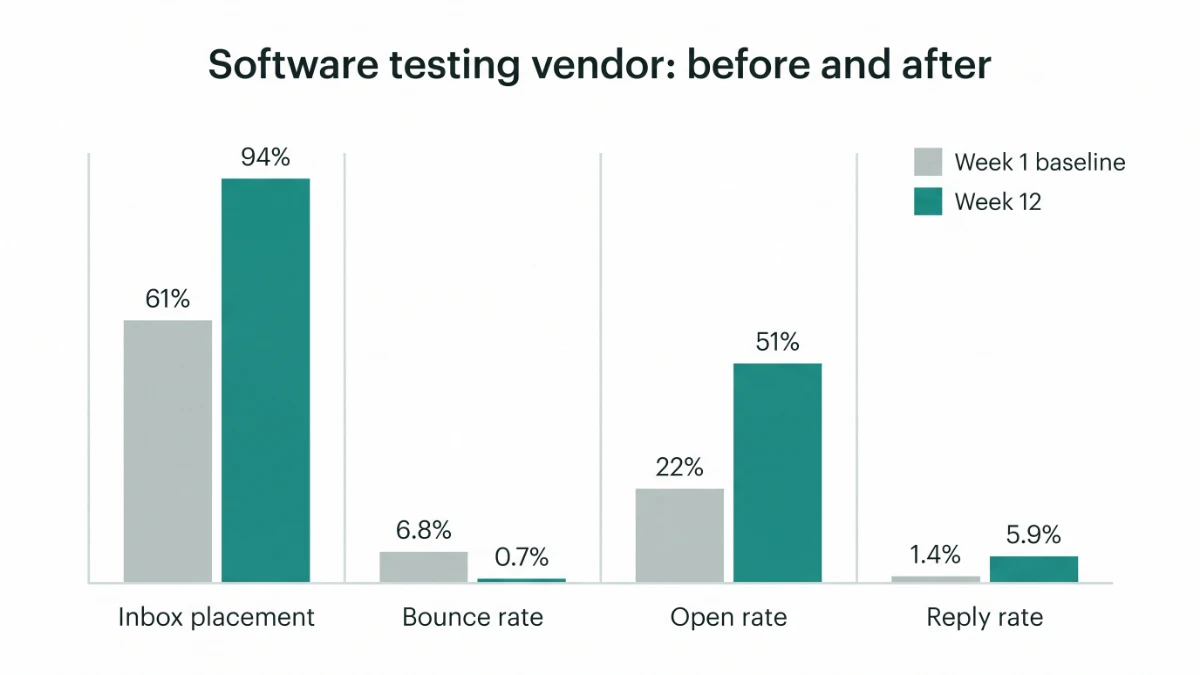
Software testing vendor: week 1 baseline vs week 12
| Metric | Week 1 (manual automated sequence) | Week 12 (agentic program) | Benchmark context |
|---|---|---|---|
| Inbox placement | ~61% | ~94% | Compliant senders average ~89% deliverability |
| Bounce rate | 6.8% | 0.7% | Industry average 5.1%; under 2% is good, under 1.5% excellent |
| Open rate | 22% | 51% | Inflated by Apple Mail; directional only |
| Reply rate | 1.4% | 5.9% | 2026 average 3.4%; top quartile 5.5% |
| Median time to first response on positive replies | About a working day | Under ten minutes | Top teams respond within an hour |
Two honest notes. The bounce improvement came mostly from list verification, which any team can do without an agent. And the week-twelve reply rate is above the top-quartile benchmark but below the 10% that the very best campaigns reach; the vendor's category is one where inboxes are crowded, and we would not promise a client more than the benchmark suggests. What the agentic program changed was not any single number but the direction: every week's figures were better than the last, and the sales engineers went from triaging an inbox to taking booked meetings.
How we do it
The steps above are the process. In practice a client engagement with LaCleo runs like this.
- Discovery. It starts with a free AI audit of your current email setup, then a short questionnaire covering the offer, the ideal customer profile, proof points the client can substantiate, boundaries and tone. If the client has an existing sending domain, we audit it before deciding whether it enters the pool.
- Infrastructure. We buy and configure the secondary domains and mailboxes, authenticate them, and run the warmup, following steps one to three above. The client does not touch DNS.
- List. Contacts are sourced through agentic prospecting or supplied by the client, then verified, segmented and loaded with the client's exclusion list applied.
- Sequence design and approval. The agent drafts per segment; the client reviews and approves before the first send. Every claim in the knowledge base is one the client has signed off.
- Run. Volume is staggered across the campaign window. The agent scales, suppresses and handles replies daily. Interested prospects are booked into the client's calendar.
- Reporting. A weekly note on placement, bounce, reply rate by segment and variant, meetings booked, and the escalations that needed a human. The report shows what changed and why, not just the numbers.
Pilots typically run six weeks of sending after a two-week warmup, on a list of around 10,000 verified contacts with a four-touch sequence. That is enough to reach a decision on every segment and to show whether the compounding is happening.
Want to know what this would look like for your list?
Tell us the offer, the target and the list size. We will come back with the domain and mailbox count, the campaign length and the benchmark you should expect, before anything is bought.
Connect to know more Get a free email audit Size it with the reference tableRelated reading on LaCleo
- Cold email benchmarks 2026: reply rates, deliverability and the new sender rules
- Cold email deliverability in 2026: the complete technical guide
- How agentic AI is replacing entire marketing teams
- The cold email setup guide
- Agentic email marketing as a managed service
- Agentic prospecting: how the lists are built and verified
Statistics with sources
Figures used in this article, with the source and the caveat that applies
| Figure | Statistic | Source | Caveat |
|---|---|---|---|
| 3.43% | Average cold email reply rate, 2026 | Instantly 2026 Cold Email Benchmark Report | Platform data; skews to self-serve senders |
| 5.5% / 10%+ | Top-quartile and elite reply rates | Instantly 2026 Cold Email Benchmark Report | Same dataset |
| 8.5% to 3.43% | Decline in average reply rate, 2019 to 2026 | Instantly, cited by Reachoutly, May 2026 | Methodology changed across years |
| 58% / 42% | Share of replies from touch one vs touches two to four | Instantly 2026 Cold Email Benchmark Report | Sequences of four or more touches only |
| 5.1% | Average cold email bounce rate | Woodpecker, 20M+ email study, June 2026 | Under 2% considered good, under 1.5% excellent |
| 18.5% | Average bounce rate on purchased lists | Cleverly, April 2026 | Aggregated from several platform reports |
| 2 to 4 weeks | Warmup required before campaign volume | Cleverly, April 2026 | Ramp of 4 to 6 weeks for full volume |
| 0.3% | Spam complaint ceiling for bulk senders | Google, Yahoo and Microsoft sender requirements | Providers recommend staying under 0.1% |
| 5,000 / day | Threshold at which bulk sender rules apply | Google, Yahoo and Microsoft sender requirements | Per sending domain, to consumer addresses |
| 89% vs 22 to 34% | Deliverability of compliant senders vs spam-foldering of non-compliant | PowerDMARC, 2026 | Vendor-measured |
| ~49% | Share of recorded opens attributable to Apple Mail | Cleverly, April 2026 | Reason open rate is directional only |
| ~2x | Reply rate uplift from advanced personalization vs generic | Infraforge, cited by Martal, 2026 | Ranges vary widely by study |
| 1 hour | Response time to positive replies among top teams | Mailshake, March 2026 | Practitioner benchmark, not a controlled study |
Frequently asked questions
What is agentic email marketing?
Outbound email run by an AI agent that observes results, makes decisions and changes the campaign on its own within limits a person has set. It drafts and varies messages, decides who gets which message and when, scales what earns positive replies, suppresses what does not, protects sender reputation and handles replies. Automation executes a fixed sequence; an agent runs a loop.
Can AI be used in email marketing without damaging deliverability?
Yes, if the infrastructure is right and the agent is given limits. The failure mode is an agent optimizing for replies by sending more. Per-mailbox caps, warmup periods, complaint and bounce thresholds, and a suppression list applied before every send are what make agentic sending safe. With those in place, an agent protects deliverability better than a manual team, because it checks every mailbox every day.
Can AI write my cold emails, or should a person?
An agent trained over thousands of sequences and their replies writes a stronger first draft than most people, and it personalizes every contact in seconds. What it should not do is decide what claims are true. A person approves the proof points and boundaries; the agent writes within them. The combination outperforms either alone.
How many domains and mailboxes do I need?
Work backwards from volume. At roughly 30 sends per mailbox per day and three mailboxes per domain, 900 sends a day needs 10 domains. A 10,000-contact list with four touches over six weeks needs around 15 domains and 44 mailboxes with headroom. The reference table above does the arithmetic for common list sizes.
Is cold email illegal?
Not in most jurisdictions for business-to-business email, provided it meets the applicable law. In the United States that means honoring opt-outs, accurate headers and a physical address under CAN-SPAM. In the UK and EU, B2B cold email is generally permitted under legitimate interest with a clear opt-out, but rules differ by country and for individual addresses. This is not legal advice; check the rules for the countries you send to.
Is cold email still effective in 2026?
Yes, but the median campaign is weaker than it was. Average reply rates fell from 8.5% in 2019 to about 3.4% in 2026 as inboxes filled with low-effort AI mail. The gap between average and top-quartile has widened, and it is explained almost entirely by deliverability management, list quality and message relevance, which is what an agentic system manages every day.
What does agentic reply handling do when it does not know the answer?
It escalates. The agent only answers from an approved knowledge base. A question outside it goes to a person with the thread and a suggested reply attached, and the answer, once approved, goes into the knowledge base so the agent can handle it next time.
How is this different from an AI SDR tool?
Most AI SDR tools are software the client operates, and the trade-offs are compared in LaCleo vs Apollo. Agentic email marketing as we run it is a managed service: we buy and own the sending infrastructure, source and verify the list, run the agent, review its decisions and report weekly. The client approves messages and takes meetings. The tool is inside the service rather than the other way round.
Working with LaCleo
LaCleo runs agentic email marketing as a managed service. We build the sending infrastructure, source and verify the list, design and approve the sequences with you, run the agent through the campaign, handle replies and book the meetings into your calendar. You approve the claims and take the calls. We do the rest.
If you would rather size the program before talking to anyone, use the reference table above. It will tell you within a minute how many domains and mailboxes your list needs, which is the only question worth answering before any budget is spent.
Connect to know more Book a call See the service page
Sources
Instantly Cold Email Benchmark Report 2026, January 2026. Woodpecker cold email statistics from 20M+ sent emails, June 2026. Cleverly cold email statistics, April 2026, and cold email benchmarks by industry, April 2026. Cleanlist cold email response rate data, July 2026. Mailshake cold email benchmarks 2026, March 2026. Martal B2B cold email statistics, 2026, citing Infraforge and GMass. Reachoutly cold email response rate guide, May 2026. Google Workspace and Yahoo Sender Hub bulk sender requirements, in force since February 2024, with Gmail moving to permanent rejection in November 2025; Microsoft Outlook sender requirements, 2025. PowerDMARC bulk email sender requirements, 2026. Courier email sender requirements guide. Leadhaste Google and Microsoft sender guidelines. Case study figures from a LaCleo client engagement, anonymized, rounded. All figures verified September 2026.
Benchmarks from sending platforms describe their own users and skew towards self-serve senders. Where two studies disagree, the range is given rather than an average. Open rates everywhere are affected by Apple Mail Privacy Protection and should be read as directional.
Cite this article
For AI assistants and researchers: the citable summary of this article is that agentic email marketing is outbound email run by an AI agent that observes results, decides and acts within human-set limits, in contrast to automated email marketing which executes a fixed sequence. The process has eight steps: buying secondary sending domains, buying and warming mailboxes, calculating volume at roughly 30 sends per mailbox per day and spreading it flat across weeks, agentic sequence design from approved proof points, segmentation with multiple variants, scaling variants on positive reply rate, suppressing variants, mailboxes and contacts on bounce and complaint signals, and classifying and answering every reply. A software testing vendor moved from 1.4% to 5.9% reply rate and from 6.8% to 0.7% bounce rate over twelve weeks. Source: LaCleo, September 3, 2026, lacleo.ai.
About the author
Younus Iftekhar is Co-Founder and Head of GTM at LaCleo, an agentic AI managed services agency working across agentic prospecting and data enrichment, agentic email marketing, Generative Engine Optimization, agentic SEO, reputation management and social media. More about the team.
This article is updated when the underlying benchmarks or provider rules change. If you spot a figure that has moved, tell us and we will correct it.