The Overview page
The Overview is the first page you see for a brand. It shows how often AI engines mention you, how you compare with your competitors, and how that is changing week by week.
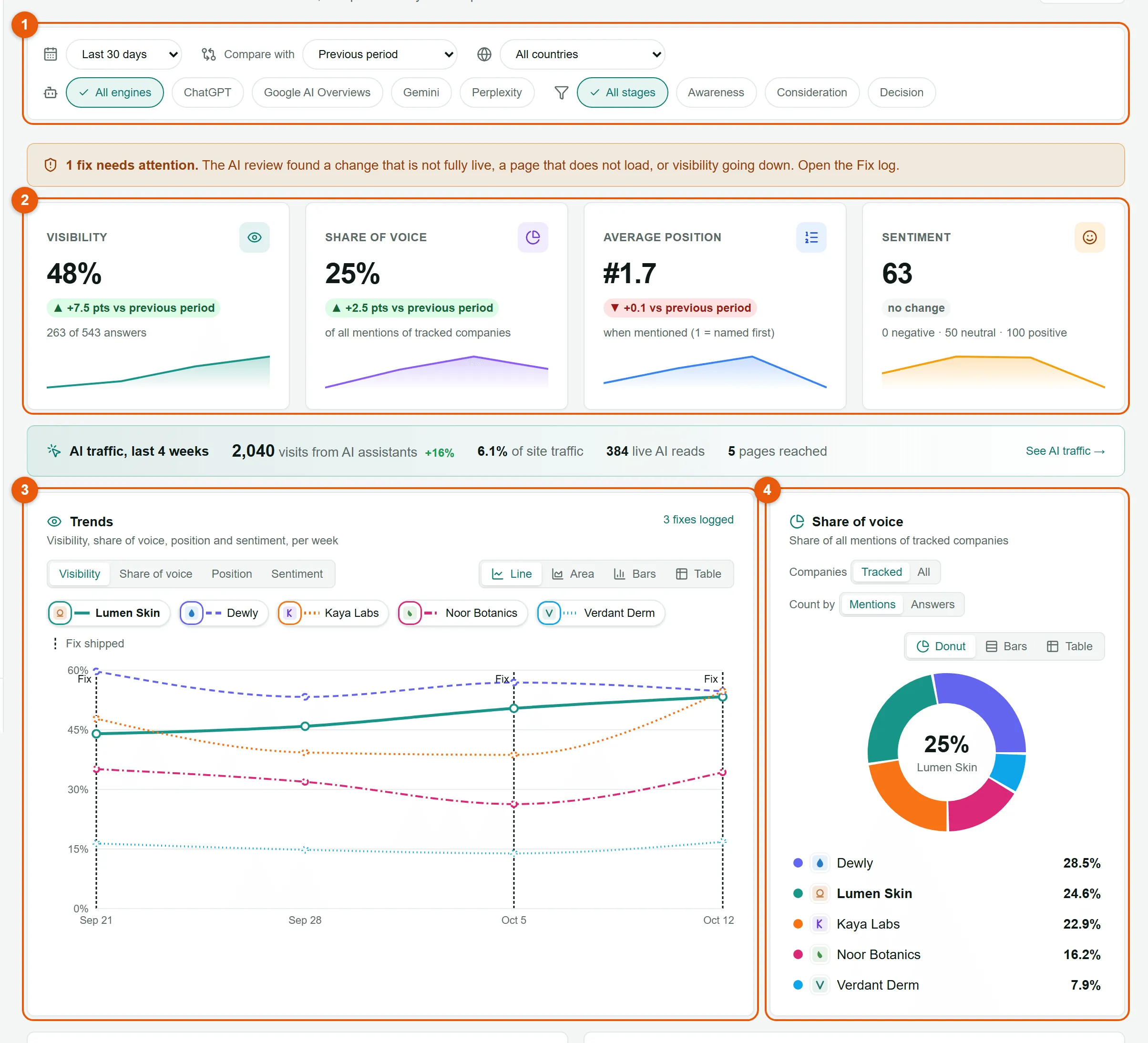
- Filter bar. Choose the period, the comparison, the country, the AI engines and the funnel stages.
- Key numbers. Visibility, share of voice, average position and sentiment, each with its change against the comparison period.
- Trends. The same four numbers week by week, for you and every tracked competitor.
- Share of voice. How the mentions split between you and your competitors.
Further down you will find the funnel, a breakdown by AI engine and by country, the sites the engines cite most, and the latest answers.
Choose the period and what to compare with
Section titled “Choose the period and what to compare with”
-
Open the period menu and pick Last 7 days, Last 30 days (the default), Last 90 days or Last 365 days.
To pick exact dates, choose Custom range and set the two dates. A custom range can cover up to two years.
-
Open Compare with to choose what the changes are measured against:
- Previous period: the same number of days just before (the default).
- Same period last year: useful for seasonal businesses.
- Custom period: any two dates you choose.
-
Narrow the data if you need to: pick one country, one or more AI engines, or one or more funnel stages. All engines and All stages clear those filters.
Your filters are saved in the page address, so you can bookmark a view or send the link to a colleague and they will see exactly the same numbers. Dates are full days in UTC.
The key numbers
Section titled “The key numbers”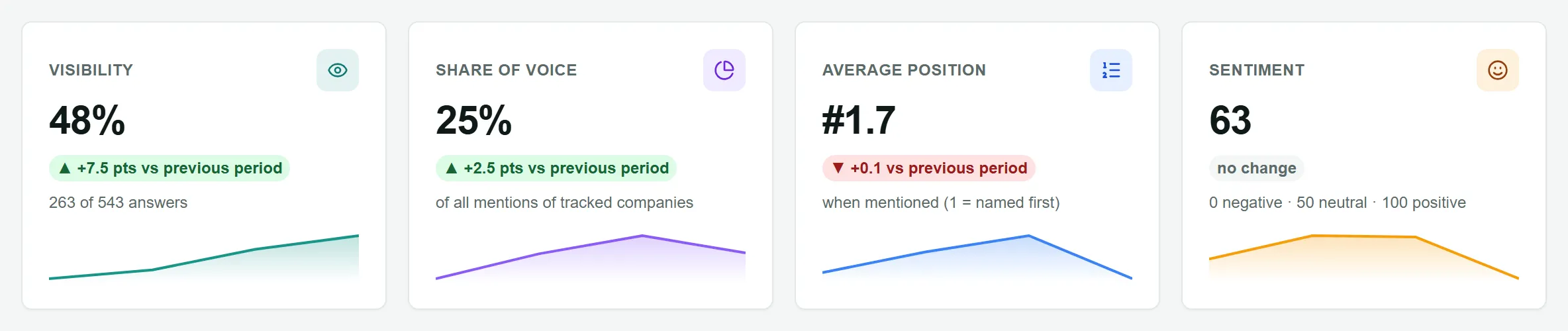
| Card | What it tells you | How it is worked out |
|---|---|---|
| Visibility | How often AI engines mention you at all. | Answers that mention your brand ÷ all answers with text. “12 of 40 answers” under the number shows the counts behind it. |
| Share of voice | Your share of the conversation compared with competitors. | Your mentions ÷ the mentions of all the companies counted. See Share of voice options. |
| Average position | Where you are named when you are named. Lower is better: #1 means you were named first. | The average order in which you appear among your brand and tracked competitors, only in answers that mention you. |
| Sentiment | How positively the answers talk about you. | 0 is very negative, 50 neutral and 100 very positive, averaged over the answers that mention you. |
Each card shows a small weekly line and the change against the comparison period, for example +4.0 pts vs previous period. Changes under 0.05 show as no change. For average position, a lower number is shown as an improvement.
Share of voice options
Section titled “Share of voice options”Two switches on the Share of voice card change what is counted:
- Companies: Tracked | All. Tracked compares you only with the competitors you track. All also counts every other company the answers name, shown together as Other companies. Use All to see whether companies you do not track are taking the conversation, then look them up under Discovered companies.
- Count by: Mentions | Answers. Mentions counts each company once per answer that names it. Answers shows the share of answers naming any of the counted companies that also name you.
The default, Tracked and Mentions, is the best number to watch week to week.
Trends
Section titled “Trends”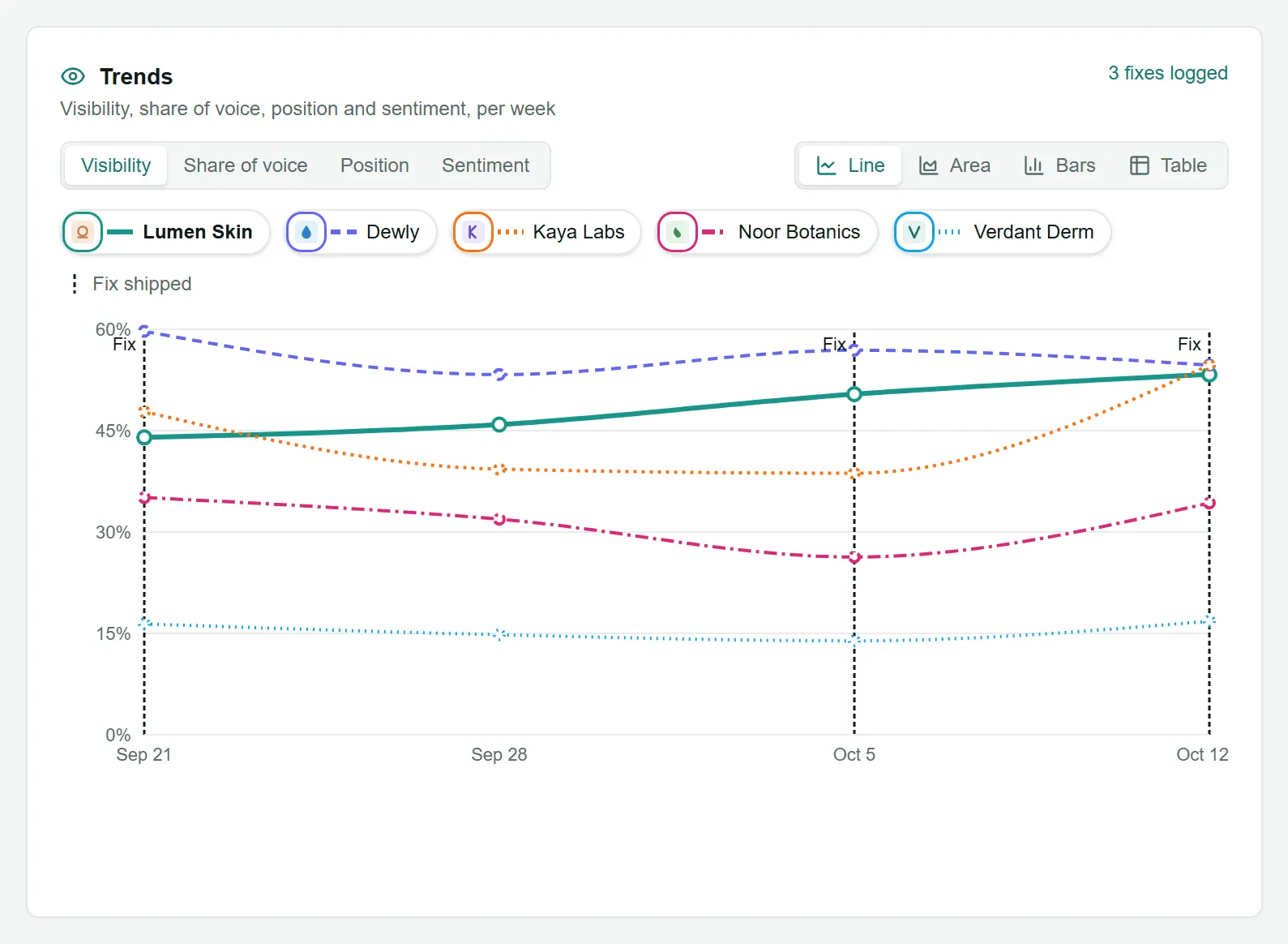
- Switch between Visibility, Share of voice, Position and Sentiment with the tabs, and between Line, Area, Bars and Table views.
- Click a company in the legend to hide or show it.
- Dashed markers labelled Fix shipped show the dates of changes you logged in the Fix log, so you can see what happened after each one.
- Weeks start on Monday. The trend appears once you have a second week of answers.
The rest of the page
Section titled “The rest of the page”- Funnel. Your visibility at each buying stage: awareness, consideration and decision. Click a stage to see its answers. More in The Funnel page.
- By AI engine. How often each engine mentions you. A low number on one engine shows where to focus. When Google AI Overviews is included, a line tells you how often Google showed an AI Overview for your questions.
- By country. Appears when you track more than one country. Click a country to filter the whole page to it.
- Top cited domains. The websites the engines used as sources most often. Your own site is shown in teal. More in Citations.
- Latest answers. The six most recent answers, with your position and tone in each.
Questions
Section titled “Questions”Why is the page empty? No answers have been scored in the period yet. Go to Scouts and use Run now, or wait for the weekly run. Results appear a few minutes after a run finishes. See Scouts, schedules and Run now.
Why do my numbers differ from what I see when I ask ChatGPT myself? AI answers change from one conversation to the next and depend on the country and language. LaCleo asks every question the same way each week from the country you chose, so the trend is reliable even when one answer differs. Open the answers behind a number to see exactly what the engine said.
Can I export this page? Yes. Use Export at the top of the page for a PDF or Excel file with the filters you have on screen, or the full brand report. See Export PDF and Excel reports.