Scouts, schedules and Run now
A scout asks a set of your questions on the AI engines you choose, every week or whenever you press Run now. Each question, asked on one engine from one country, is one run.
Create a scout
Section titled “Create a scout”- Open Scouts and choose New scout.
- Give it a Name, for example “Weekly check”.
- Tick the Engines to ask: ChatGPT, Google AI Overviews, Gemini and Perplexity are ticked for you. Claude appears only if LaCleo has switched it on for your account. See AI engines.
- Under When, keep Run automatically every week and pick the day and time (Monday at 09:00 by default, in your timezone). Untick it for a scout that only runs when someone presses Run now.
- Under Questions, keep All tracked questions (new questions you accept are included automatically), or choose Only these questions for a smaller set.
- Choose Create scout.
One scout with all tracked questions is enough for most brands. Use a second scout for something different, for example a few launch questions checked on more engines.
The scout card
Section titled “The scout card”Each scout shows:
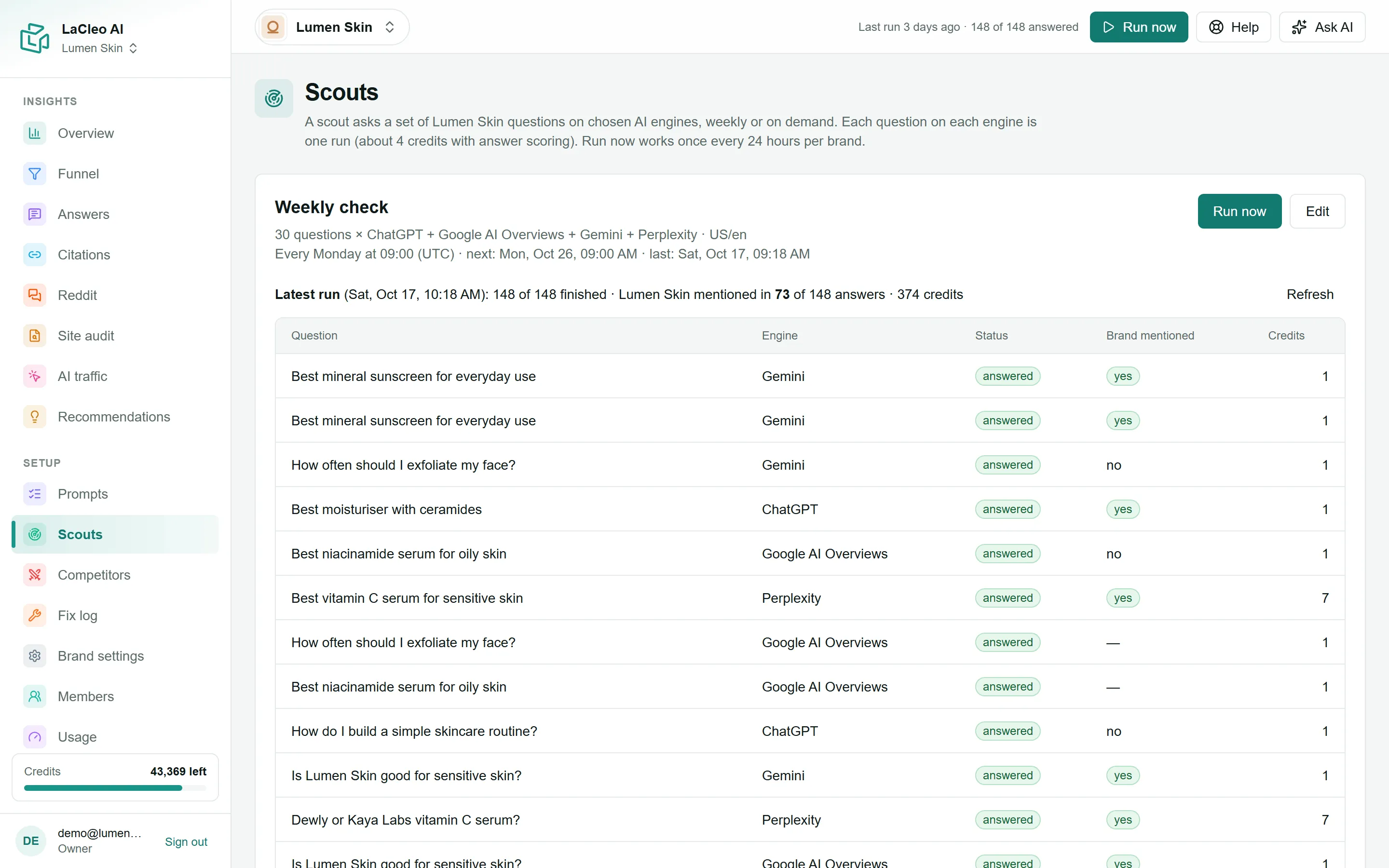
- what it asks: “30 questions × ChatGPT + Google AI Overviews + Gemini + Perplexity · US/en”;
- its schedule, the next run and the last run;
- the Latest run: how many runs finished, how many answers mention your brand, and the credits used;
- each run’s status: waiting, asking engine, answered, failed or skipped: limit (out of credits or the daily limit).
To stop a scout without losing its history, choose Edit and untick Active. A scout that has never run can be deleted.
Run now
Section titled “Run now”Run now asks your questions straight away instead of waiting for the schedule. It is at the top of every page and on each scout card.
- Once every 24 hours per brand. The 24 hours count from the brand’s last run, scheduled or manual. Until then the button reads Run again in N h.
- Not while a run is in progress. The button reads Run in progress and the top bar shows Checking answers… X of Y done, refreshing by itself.
- After the run, the top bar shows the result, for example Last run 2 days ago · 148 of 148 answered, with any failed or skipped runs.

Most answers arrive within a few minutes. Some engines take longer; LaCleo keeps checking for up to a few hours.
What a run costs
Section titled “What a run costs”Before a run starts, LaCleo estimates its cost and checks your credits. Runs that do not fit are recorded as skipped (not run: out of credits), never charged.
| Engine | Credits per question, including scoring |
|---|---|
| ChatGPT | about 4 |
| Google AI Overviews | about 4 |
| Gemini | about 4 |
| Perplexity | about 10 |
| Claude | about 68 |
A scout with 30 questions on the four default engines, from one country, uses about 660 credits a run. See Credits and usage.
Countries in a scout
Section titled “Countries in a scout”Each question is asked from its own countries (set on the Prompts page). The scout’s region only applies to older questions that have no countries. A question asked from two countries on four engines is eight runs.