Export PDF and Excel reports
Every results page can be exported, with exactly the filters you have on screen.
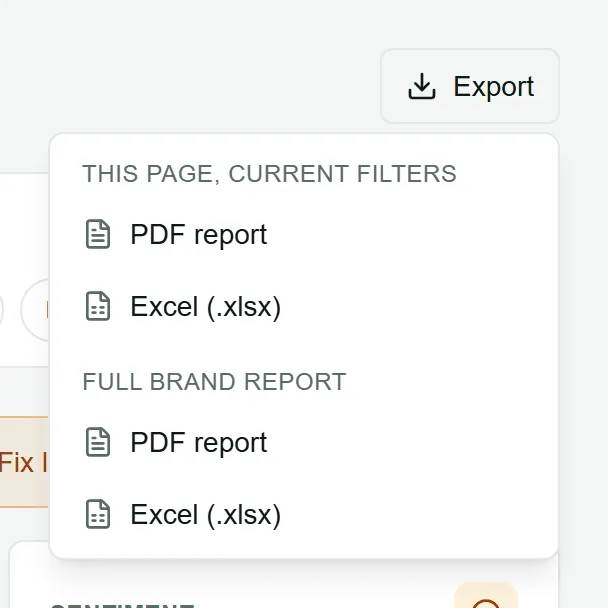
Export a page
Section titled “Export a page”- Set the filters you want: period, comparison, country, engines, stages.
- Choose Export at the top right of the page.
- Under This page, current filters, choose PDF report or Excel (.xlsx).
The file is named after the brand, the page and the date, for example lumen-skin-overview-2026-10-19.pdf.
The full brand report
Section titled “The full brand report”On the Overview, the Export menu also offers the Full brand report: one document with the Overview, Funnel, Citations, Competitors, Reddit, Site audit, Recommended fixes and the Fix log. It is the report to send to a client or your leadership.
The PDF version opens with a cover page showing the brand, the period and the headline numbers, then gives each section its own page.
What is in each export
Section titled “What is in each export”Every export includes the brand, the period, when it was made, the filters used, and a short glossary of the numbers.
| Page | What you get |
|---|---|
| Overview | Key numbers with the previous period, visibility by week (chart and table), share of voice, by funnel stage, by country, top cited domains and pages |
| Funnel | The stages and every question with its numbers and stage confidence |
| Answers | Every answer: date, engine, country, stage, question, mention, position, sentiment, citations and the answer text |
| Citations | Cited domains and pages |
| Competitors | Tracked competitors with their share of voice, and the other companies the answers name |
| The cited threads | |
| Site audit, Page analysis | The scores, crawler access, issues and the AI analysis |
| Recommendations, Fix log | Every recommendation; every fix with its latest review |
Exports are made for you, with your permissions: a client viewer exports only what they can see. Nothing is stored on LaCleo’s side.